
Feature Adoption & User Education
In-app messages that drive adoption and re-engagement
PLG adoption, onboarding nudges, “Did you know?” and re-engagement. Use standalone in-app notifications to teach users about features and nudge them at the right time — without cluttering your changelog.
No credit card required · 15-day trial · All features included



Who it's for
- Product-led growth teams that want to increase feature adoption with in-app messages
- Customer success and onboarding teams that nudge users at key moments
- Product teams that run “Did you know?” or re-engagement campaigns without a separate tool
Common scenarios
- Onboarding tips and “next step” nudges for new signups
- “Did you know?” messages for underused features, targeted by segment
- Re-engagement messages for inactive or at-risk users
- Feature launch education (how to use X) alongside or instead of changelog
- In-app tips that don’t belong in release notes (evergreen education)
How AnnounceKit helps
Standalone in-app notifications
Messages that aren’t tied to a changelog post. Use for adoption, onboarding, and education without mixing with product release notes.
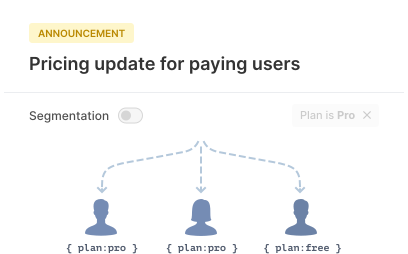
Segmentation
Target by signup date, plan, role, or usage so the right users see the right tips. Reduce noise and increase relevance.
Multiple formats
Toasts, banners, modals — choose the format that fits the message. Track views and engagement to see what works.
Frequently asked questions
What is feature adoption and user education in AnnounceKit?
Using in-app messages (standalone notifications) to teach users about features, nudge them during onboarding, or re-engage them. You can target by segment and track engagement.
How do I use AnnounceKit for onboarding nudges?
Create standalone in-app notifications targeted at new users or by signup date. Use toasts, banners, or modals to highlight key features or next steps.
Can I target \"Did you know\" messages by user segment?
Yes. Use segmentation to show tips to users who haven’t used a feature yet, or by plan, role, or usage.
What is the difference between changelog and user education messages?
Changelog posts are product updates and release notes. User education messages are standalone in-app notifications for adoption, onboarding, or re-engagement.
Who is feature adoption and user education for?
Product-led growth and customer success teams that want to increase feature adoption, improve onboarding, and re-engage users with in-app messages.